JooDax
The integrated accounting program: the accounting at its heart, and the programs your company chooses around it, in one company file
Installing and updating
- 1Run the file you downloadedThe installer opens; choose where to install, or leave it as it is.
- 2If Windows shows its blue screenWindows shows “Windows protected your PC” for programs it does not know yet. Click “More info”, then “Run anyway”.
- 3Allow itWhen Windows asks whether to let the program make changes, click “Yes”. The program then opens and the 15-day trial begins.
- 4Updates reach you inside the programWhen a new version is out, a notice appears at the top of the program. Click “Update now” and it downloads and installs without coming back to the site; your data stays as it is.
One program for your whole company
- 1
The accounting at its heart
Customers and suppliers, quotes, orders and invoices, payments and purchases, stock and expenses, the bank, the journal and the financial reports. In every company from its first day.
- 2
31 programs working inside it
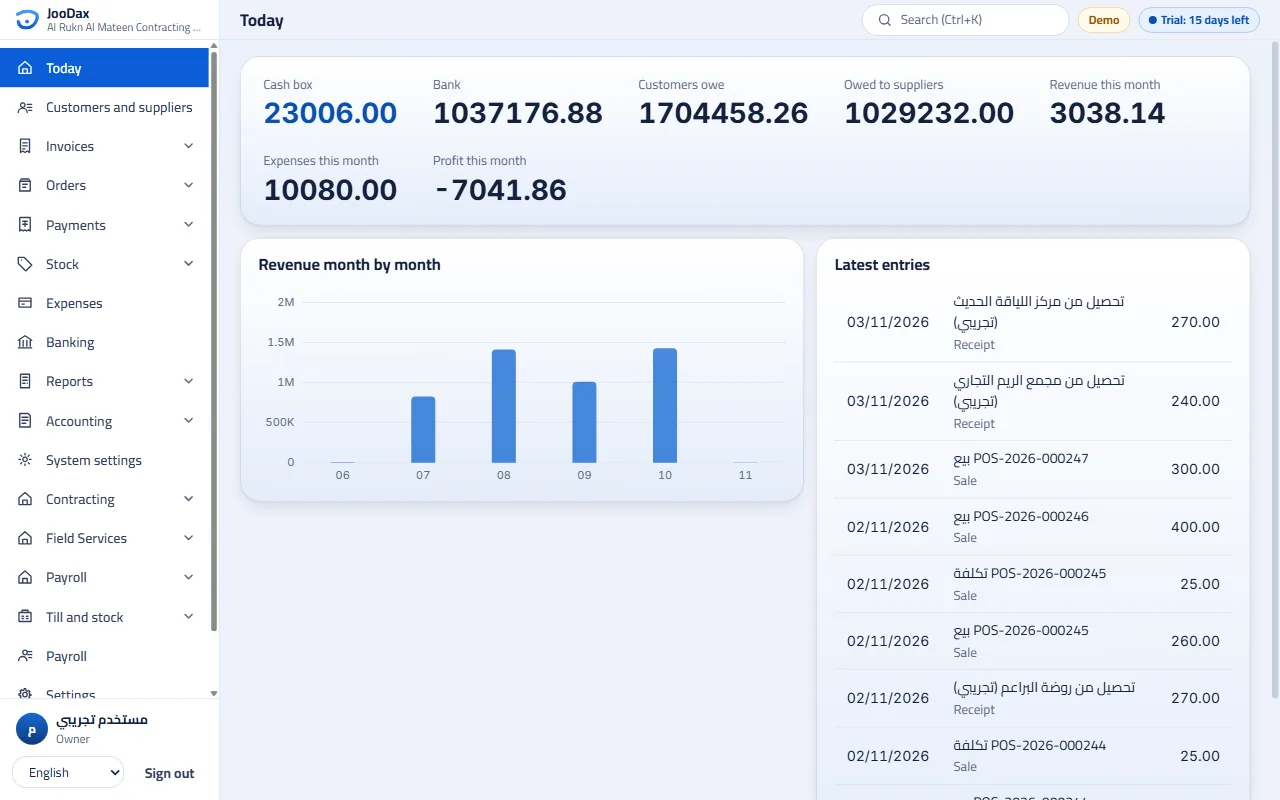
Choose your business’s programs and they work inside JooDax on the same company file: one set of customers, items, employees and one ledger for all of them. A sale at the till, a progress claim and a salary reach one ledger, and nothing is typed twice.
- 3
Several companies
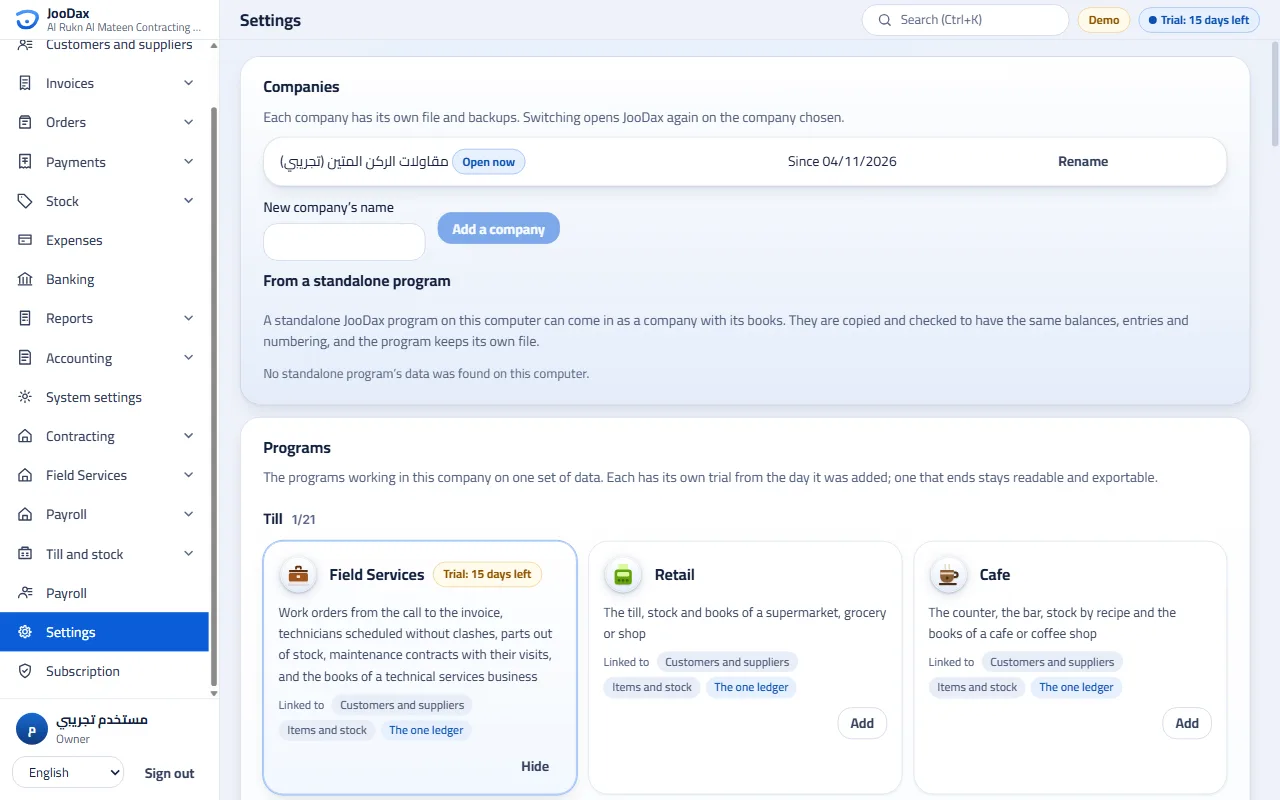
Each company has its own file, its own backups and its own programs, and you move between them from the settings or the start screen.
- 4
The cloud workspace’s look
The sidebar with the site’s sections, then a section for each program switched on, and lists with status tabs. Whoever knows JooDax on the site knows it on the computer.
- 5
Moving data to and from the cloud
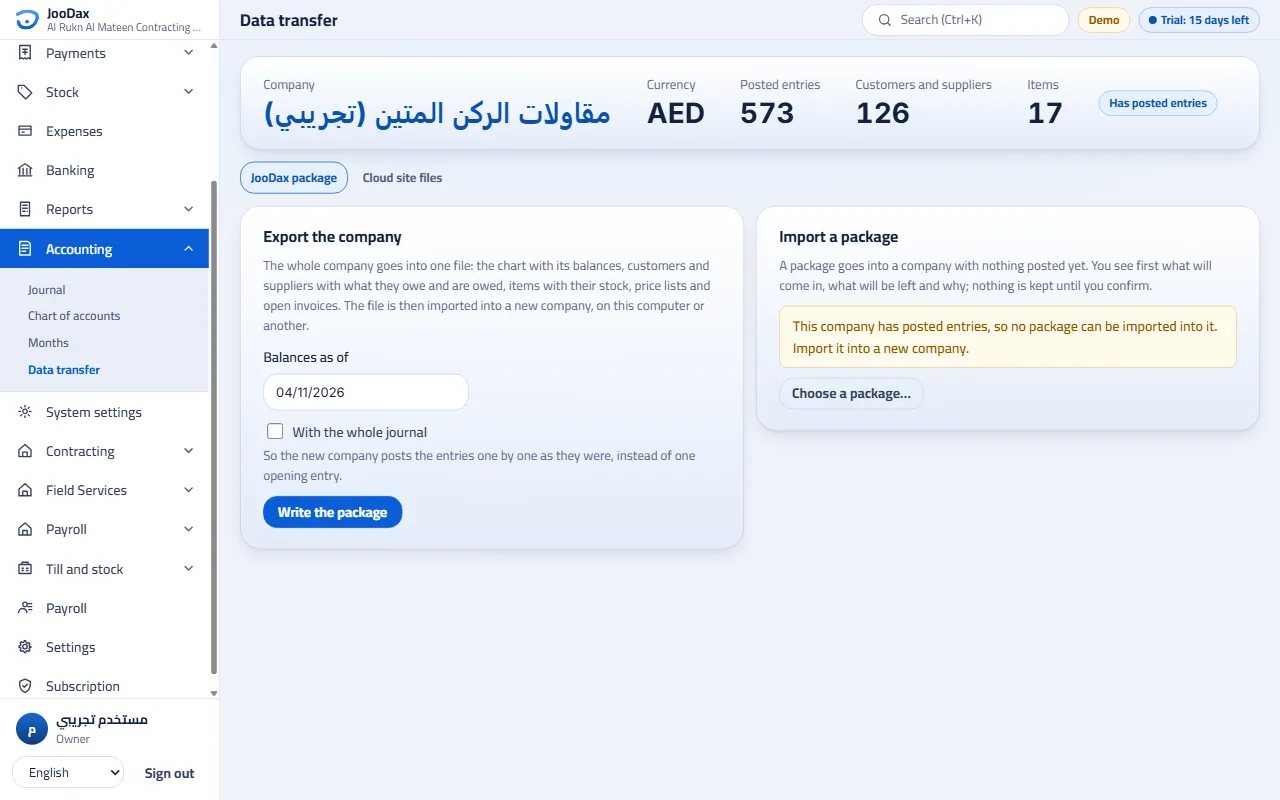
No syncing: your data stays independent on your computer. The whole company moves in a “JooDax package” between the program and the cloud site, both ways, with its balances, customers and items, a preview before anything is saved and a report of what came in and what was left. The program also reads the site’s export files and writes what its importer accepts.
- 6
The standalone programs stay
Whoever needs one trade subscribes to its program alone. And whoever started with a standalone program brings its file into JooDax as a company with its books, checked to have the same balances, entries and numbering.
Each program in its own section
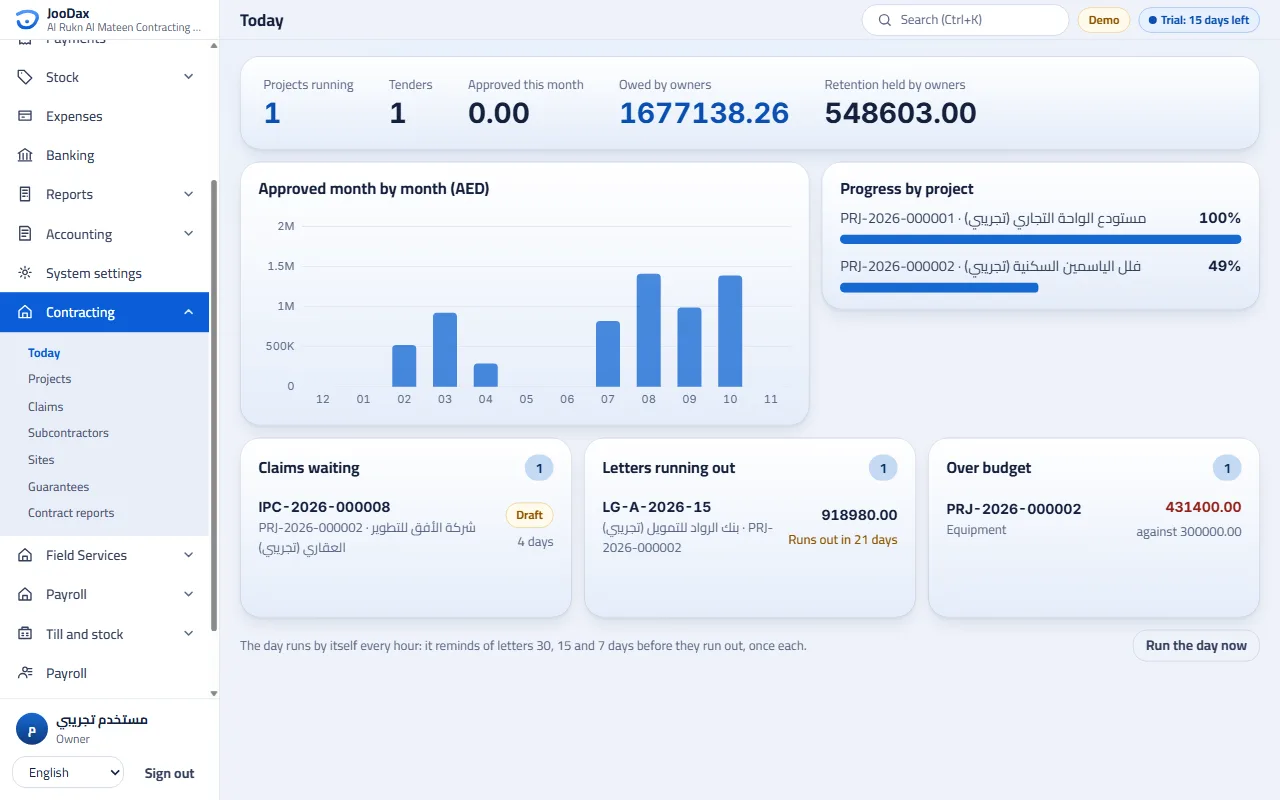
Each program’s pages sit under its name in the sidebar, with its own board, lists and reports, and what it records reaches the company’s one ledger.
A screenshot of the program, with demo data Companies and programs in one place
Add a company, or bring a standalone program’s file into one, and switch a program on or hide it. Each card says what the program adds and what it is linked to.
A screenshot of the program, with demo data The JooDax package
Write the whole company into one file, and import it into a company with nothing posted yet, on this computer or on the cloud site, after a preview of what will come in and what will be left.
A screenshot of the program, with demo data
What is your business?
The installer suggests a ready set for each business, and the accounting is always in every company. You add or remove what you like afterwards, and add programs later from Settings → Programs.
- Subscribe with this set
Contracting
Accounting, Contracting, Payroll, Field Services
Optional: Building Materials
- Subscribe with this set
Cafe
Accounting, Cafe
Optional: Bakery
- Subscribe with this set
Clinic
Accounting, Clinic
Optional: Pharmacy
- Subscribe with this set
Retail
Accounting, Retail
- Subscribe with this set
Restaurant
Accounting, Restaurant
- Subscribe with this set
Another business
The accounting alone, and you choose the programs yourself
The 31 programs, in five groups
Each of them is a module in JooDax, and each is also sold as a standalone program. Open any of them to see what it does.
Till21
- RetailThe till, stock and books of a supermarket, grocery or shop
- CafeThe counter, the bar, stock by recipe and the books of a cafe or coffee shop
- RestaurantThe dining room, the kitchen, delivery, stock by recipe and the books of a restaurant
- PharmacyThe counter, prescriptions, lots and expiry, insurers and their claims, the controlled register and the books of a pharmacy
- GoldThe day's gold price, pieces with their weight and making charge, exchanges, used gold and the books of a jeweller
- FashionStyles in their sizes and colours, seasons and markdowns, exchanges, perfume and the books of a fashion shop
- ElectronicsDevices by serial and IMEI, warranty, repairs and the books of a phone and electronics shop
- WholesalePrice lists, credit limits, invoices on account, collections, aging, reps and the books of a wholesaler
- BakeryProduction recipes, the morning's run, orders taken ahead, sales by weight, waste and the books of a bakery
- LaundryThe ticket by the piece with each garment's price for each service, express and pickup, paid at intake or on collection, the rack, what customers owe and the books of a laundry
- OpticsA prescription for each eye, frames in stock and lenses from the lab, the job with a deposit until it is handed over, each job's profit and the books of an optician
- Building MaterialsQuotations that become invoices, credit within each customer's limit, deliveries in parts, collections, the ageing and the books of a building-materials merchant
- FitnessCheck-in by card, memberships renewed and frozen, revenue earned by the days, who ends soon, attendance and the books of a fitness club
- EventsHalls booked by the session, deposits and confirmation, catering by the guest, payments before and after the event, revenue on its night, occupancy and the books of an events venue
- HospitalityRooms on a board by their state, stays by their nights, guests in to a clean room, extras charged, paid ahead, billed on leaving, apartments by the month, occupancy and the books of a hotel
- EducationStudents registered in classes with their capacity, the year’s fees in instalments, payments and what is late by how late, fees earned over the year’s days, withdrawals, and the books of a school
- Field ServicesWork orders from the call to the invoice, technicians scheduled without clashes, parts out of stock, maintenance contracts with their visits, and the books of a technical services business
- ManufacturingBills of materials, production orders with what they are short of, work in process, a real cost for every order, sales and collections, and the books of a workshop
- LogisticsShipments and their invoices, trips within their trucks' load, cash on delivery held for the senders, each trip's costs and profit, and the books of a haulier
- BrokerageListings and requests matched, viewings, deals with a commission invoice for each side and the agent's share, and the books of a brokerage
- TravelBookings and quotes, the agency's fee with its tax and the cost passed through to the supplier, cancellations with what the supplier gives back, and the books of a travel agency
Bookings2
Contracts3
- InstalmentsContracts, collection, investors, the overdue and the books of an instalment and finance office
- PropertyProperties, units, leases, rent, deposits, cheques, owners, repairs and the books of a property office
- Car RentalClasses and prices, the fleet, reservations, the agreement with its deposit, the return billed for you, fines and the books of a rental office
Projects2
Back office3
- AccountingThe chart of accounts, entries and vouchers, account statements, the income statement and financial position, and closed months, for any business
- PayrollEmployees, their leave and advances, the payroll run with social insurance, end of service and the bank's file, and the settlement of those who leave
- NonprofitGeneral and restricted funds, donations, beneficiaries, aid requested and decided, and the charity's books
The subscription
- A base subscription for the accounting, and each module you add has its own.
- Paid in advance for a term you choose, from 1 month to 10 years; the longer the term, the larger the discount. Each branch takes one device, its main device.
- Each module has its own 15-day trial, from the day it is added to the company.
- Renew before the end and the term is added to what is left. If a module ends it still shows and exports its data, and takes no new work until you renew it.
Link the computer to your account
- 1In JooDax, choose “Link my account” on its subscription page, or at the installer’s last step.
- 2Your browser opens the linking page with a short code. Sign in and choose the subscription.
- 3The program receives its licence by itself, without typing a serial. Activating with the serial stays available.
The linking address carries nothing about you: a temporary code that lasts ten minutes and is used once.